
Every test report issued by the UNH-IOL contains a digital signature as proof of its authenticity.
This process establishes the validity of documents (typically test plan reports) to assure the reader that the test results have not been altered.
Validating a UNH-IOL Document
With the proper UNH-IOL certificate(s) installed, all documents certified by us will display the Signatures navigation pane at the top of the document when opened in Adobe Reader.

New certificates are issued at the beginning of each calendar year and are available on our certificates page.
A test report that does not bear this certification may be a forgery. Please contact us if you have any questions concerning reports with missing or invalid certification.
Validating a UNH-IOL Certificate
Document certification contains both the MD5 and SHA-1 "fingerprints" of the certificate used to sign it. For further assurance that a document is valid, the fingerprint of the certificate itself should match the correct UNH-IOL certificate fingerprint for the year that the report was issued.
With Adobe Reader X or greater do the following:
Step 1
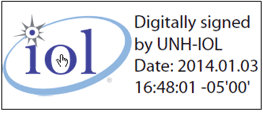
Scroll down in the report until you see the digital signature badge. Click on the digital signature badge to open the Signature Properties dialog box. Ensure that document certification is valid.
Step 2
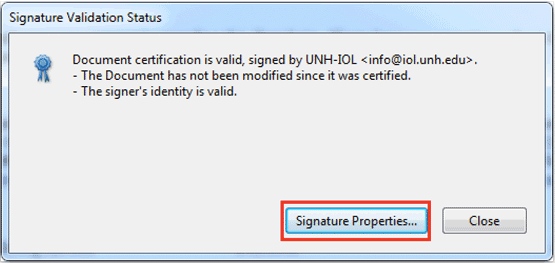
Click Signature Properties in the Signature Validation Status dialog box.
Step 3
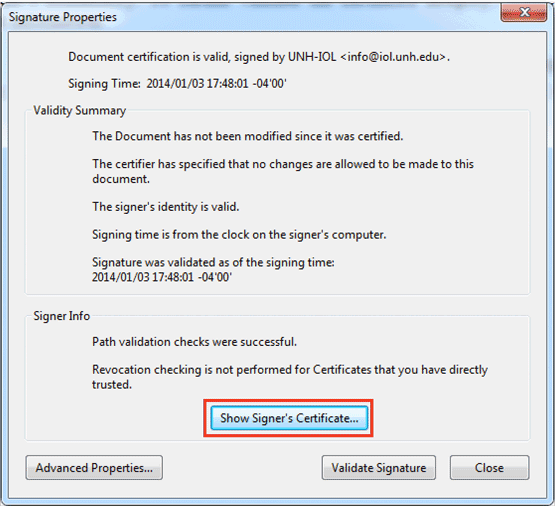
Click Show Signer's Certificate in the Signature Properties dialog box.
Step 4
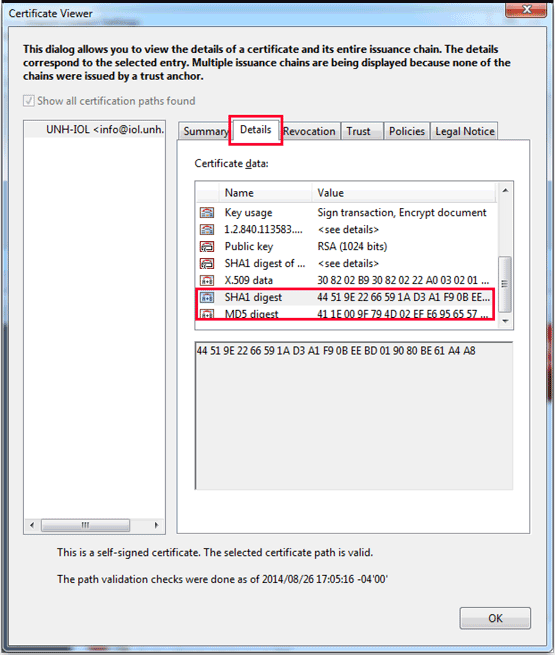
Click on the Details tab in the Certificate Viewer, and then scroll down through the Certificate data until you see the SHA1 Digest and MD5 Digest fields.
Step 5
Select SHA1 Digest and MD5 Digest from the list to view the full values of these fields. Verify that the MD5 and SHA-1 Fingerprints in the certificate match those located in the report. If the fingerprints do not match then the test suite report could be a forgery.
The digests must match exactly with those published on our Certificates and Fingerprints page. New certificates are published yearly. Be sure to compare fingerprints using the certificate from the same year the report was published.